What is GST370 employee and partner GST/HST rebate?
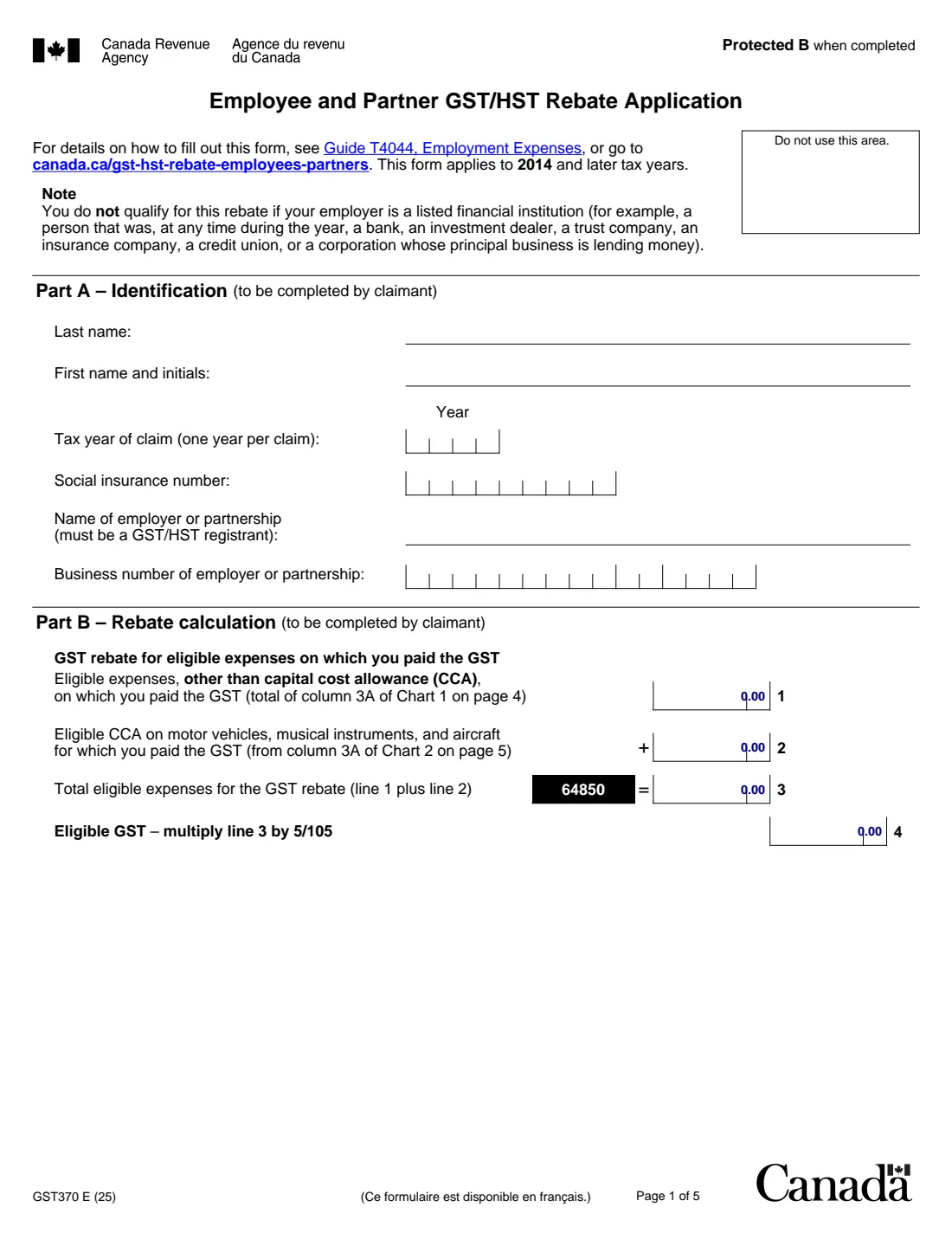
If you deducted employment expenses as an employee, or expenses as a partner, on your income tax return, part of what you paid may have been GST or HST. Form GST370 lets you claim a rebate of that tax. The CRA says you may be eligible if your employer is a GST/HST registrant (other than a listed financial institution), or if you are a member of a GST/HST-registered partnership and reported your share of its income.
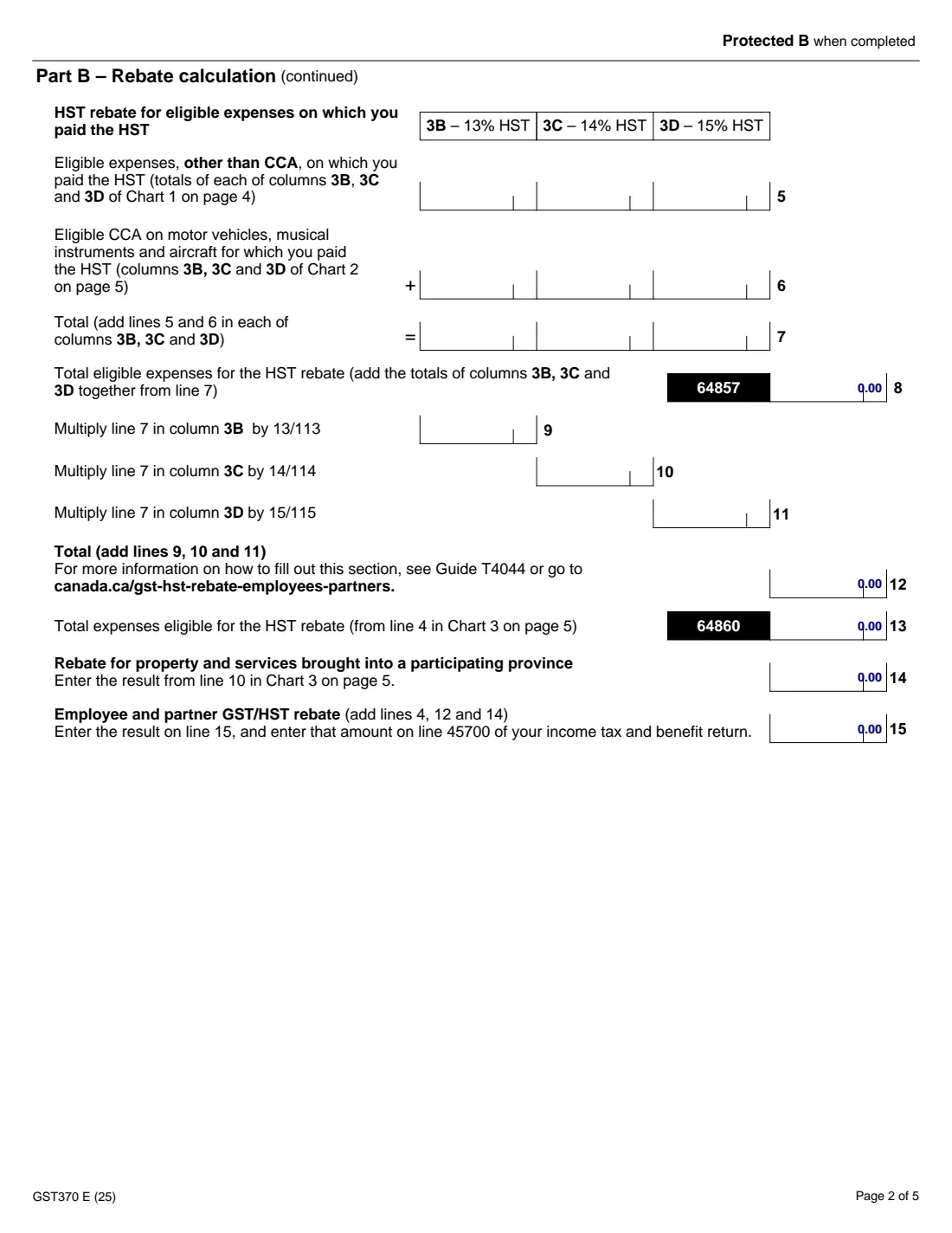
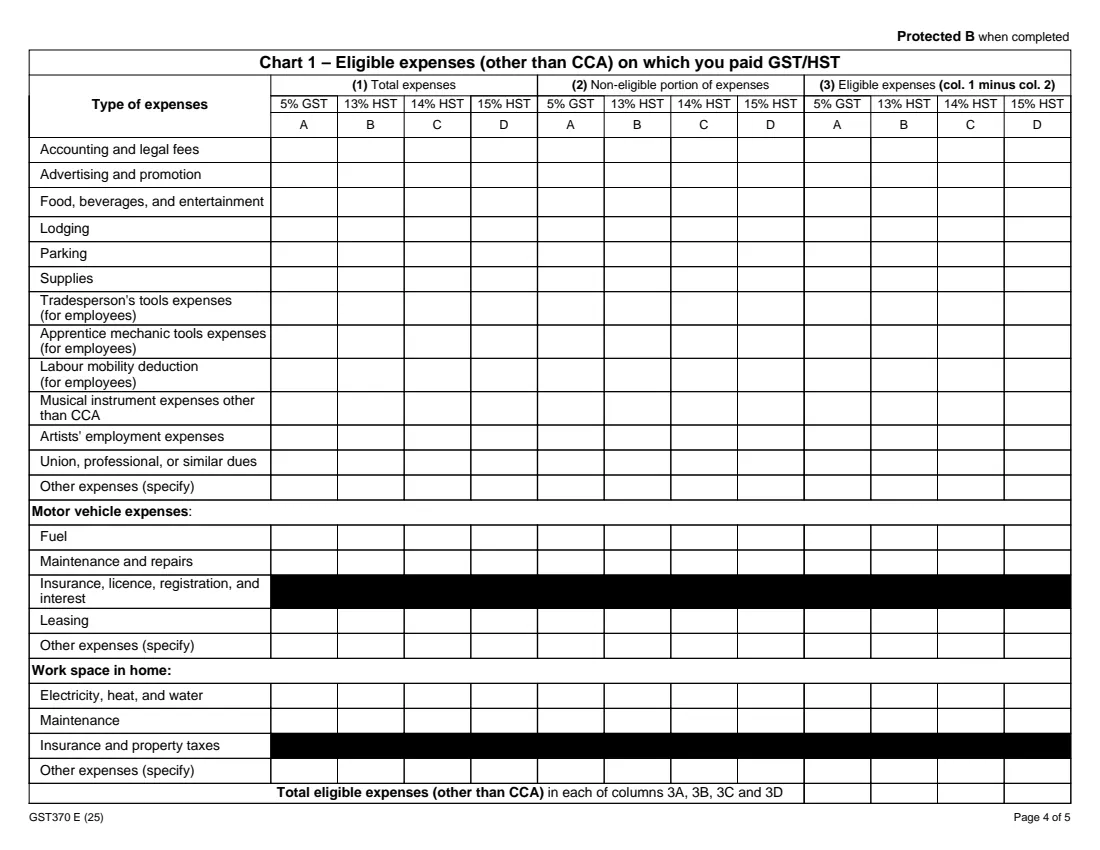
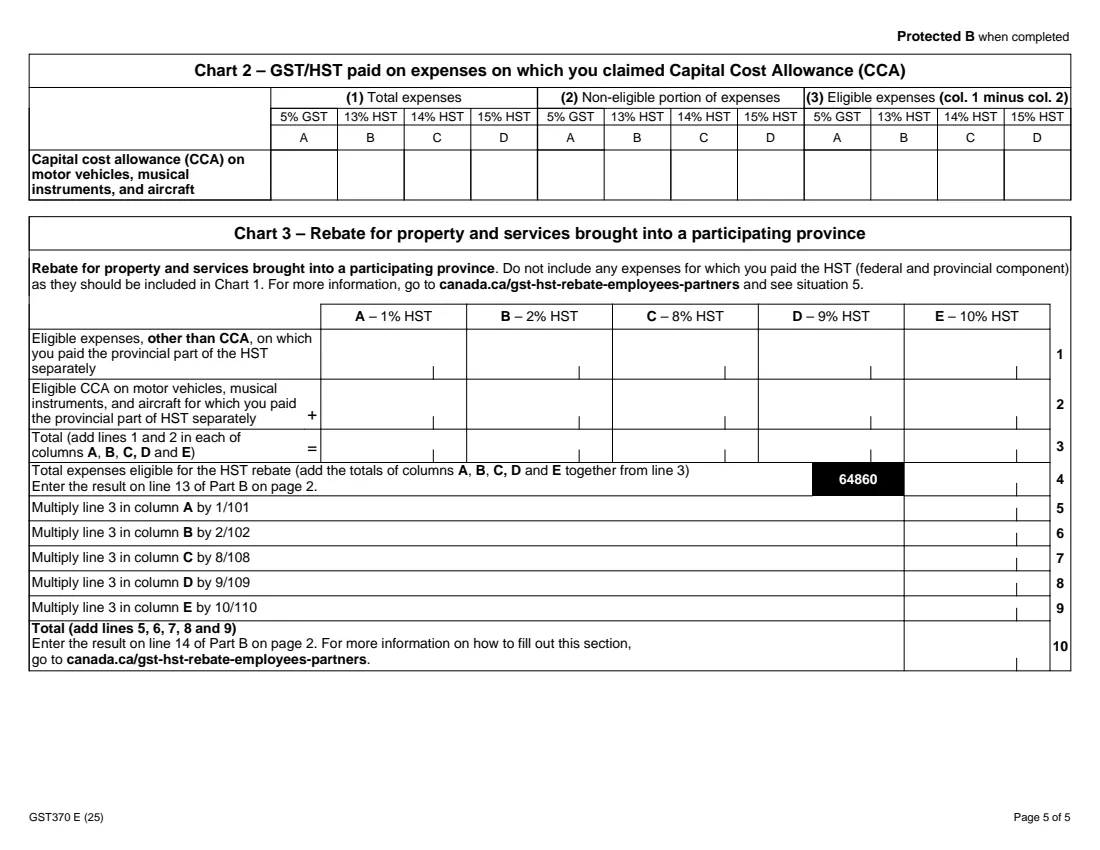
The form has three charts and a calculation. Chart 1 lists your expenses (accounting and legal fees, supplies, tools, motor vehicle expenses, work space in the home and more) by the tax rate you paid: 5% GST or 13%, 14% or 15% HST. Chart 2 covers capital cost allowance on motor vehicles, musical instruments and aircraft, and Chart 3 covers property and services brought into a participating province where you paid the provincial part of the HST separately. Part B then turns the eligible amounts into your rebate, which you claim on line 45700 of your return.
FileIt asks only for the columns you actually paid, works out every eligible amount, total and rebate line in dollars and cents, and prints it all into the CRA's own GST370 PDF. Your employer's business number, your SIN and names with accents print in the right boxes. The finished PDF is saved in your FileIt vault for your records; FileIt never files anything with the CRA for you.
- Who fills it
- Employees who deducted employment expenses, and partners who deducted partnership expenses, on their return
- Claimed on
- Line 45700 of your income tax and benefit return (line 15 of the form)
- One claim per
- Tax year; the form applies to 2014 and later tax years
- Signatures
- You sign Part D. An authorized officer of your employer or partnership signs Part C, only if it applies
- Edition
- GST370 E (25)
- Rates on the form
- 5% GST; 13%, 14% and 15% HST; and 1%, 2%, 8%, 9% and 10% for the provincial part in Chart 3
Who needs to fill out GST370 employee and partner GST/HST rebate?
- Employees who deducted employment expenses on line 21200 or 22900 of their return and paid GST or HST on them.
- Partners in a GST/HST-registered partnership who deducted expenses on lines 13499 to 14300 and reported their share of the partnership's income.
- Commissioned salespeople, tradespeople, apprentice mechanics, artists and musicians with work expenses on which they paid GST/HST.
- People who work from home and deducted work-space-in-home expenses such as electricity, heat and water or maintenance.
- Anyone who claimed capital cost allowance on a motor vehicle, musical instrument or aircraft used for work.
When to use GST370 employee and partner GST/HST rebate
- When you prepare your income tax return for a year in which you deducted employment or partnership expenses that included GST or HST.
- For each tax year separately: the form says one year per claim.
- For an earlier year, as the form applies to 2014 and later tax years.
- Not if your employer is a listed financial institution, such as a bank, investment dealer, trust company, insurance company or credit union: the form says you do not qualify.
What you need before you start
- Your social insurance number and the tax year you are claiming for.
- Your employer's or partnership's name and business number (9 digits, RT and 4 digits).
- Your list of deducted expenses for the year, split by the GST or HST rate you paid on each.
- The part of each expense that is not eligible, for example amounts reimbursed to you.
- The capital cost allowance you claimed on a motor vehicle, musical instrument or aircraft, if any.
- If you were paid an allowance your employer did not consider reasonable: the amount, the reason, and an authorized officer to sign Part C.
What’s on GST370 employee and partner GST/HST rebate
The 2025 edition has 5 pages. FileIt asks for it in 9 parts:
- Part A: IdentificationClaimant (employee or partner)
- Charts 1 and 2: expenses on which you paid 5% GST (column A)Claimant (employee or partner)
- Charts 1 and 2: expenses on which you paid 13% HST (column B)Claimant (employee or partner)
- Charts 1 and 2: expenses on which you paid 14% HST (column C)Claimant (employee or partner)
- Charts 1 and 2: expenses on which you paid 15% HST (column D)Claimant (employee or partner)
- Chart 3: property and services brought into a participating provinceClaimant (employee or partner)
- Part B: Rebate calculationClaimant (employee or partner)
- Part C: Declaration by your employer or partnershipEmployer or partnership
- Part D: CertificationClaimant (employee or partner)
How to fill out GST370 employee and partner GST/HST rebate, step by step
1 Part A: Identification
Enter your last name, first name and initials, the tax year of the claim, your social insurance number, and the name and business number of your employer or partnership. The employer or partnership must be a GST/HST registrant.
2 Chart 1: Expenses other than CCA
For each type of expense you deducted, enter the total you paid (column 1) and any non-eligible portion (column 2) under the GST or HST rate you paid. Column 3, the eligible amount, is column 1 minus column 2. The rows cover accounting and legal fees, advertising, food and entertainment, lodging, parking, supplies, tradesperson's and apprentice mechanic tools, labour mobility, musical instruments, artists' expenses, dues, motor vehicle expenses, work space in the home and other expenses. In FileIt you switch on only the tax rates you paid, and FileIt works out column 3 and the totals.
3 Chart 2: Capital cost allowance
Enter the capital cost allowance you claimed on motor vehicles, musical instruments and aircraft for which you paid GST or HST, with any non-eligible portion, by rate. The eligible amount goes to Part B.
4 Chart 3: Property and services brought into a participating province
Only for expenses where you paid the provincial part of the HST separately. The chart has columns for 1%, 2%, 8%, 9% and 10%. The form says not to include expenses on which you paid the full HST; those belong in Chart 1. FileIt totals each column and applies the fractions printed on the form (1/101, 2/102, 8/108, 9/109 and 10/110).
5 Part B: Rebate calculation
Line 4 is your eligible GST (eligible 5% expenses × 5/105). Lines 9 to 11 apply 13/113, 14/114 and 15/115 to the HST columns, line 12 totals them, and line 14 is the Chart 3 rebate. Line 15, the sum of lines 4, 12 and 14, is your rebate: enter it on line 45700 of your return. FileIt calculates every line.
6 Parts C and D: Declarations
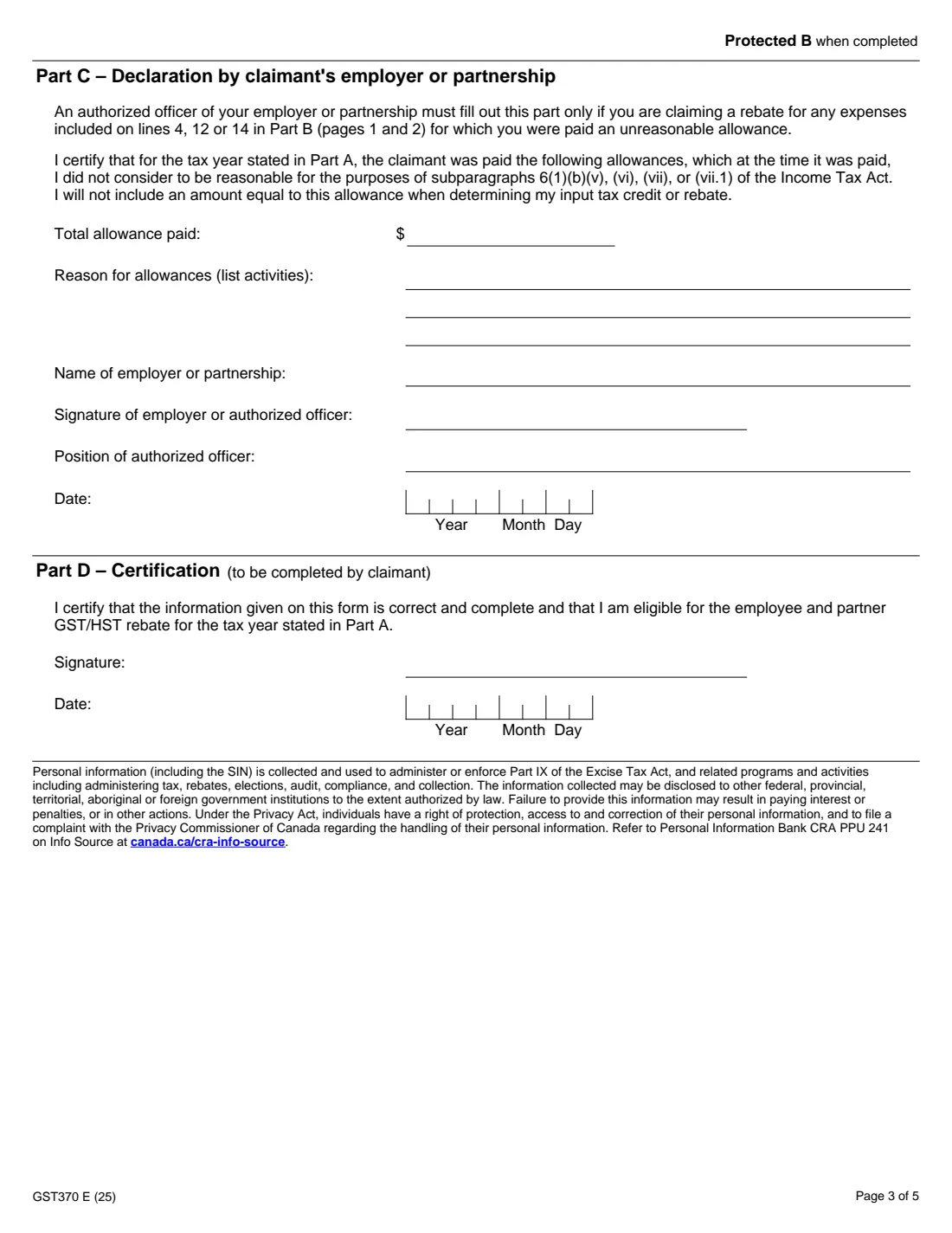
Part C is completed by an authorized officer of your employer or partnership only if you claim a rebate for expenses for which you were paid an allowance that, when paid, they did not consider reasonable under the Income Tax Act. Part D is your own certification that the information is correct and complete and that you are eligible. You sign and date it.
Common mistakes to avoid
- Claiming when your employer is a listed financial institution, which the form says disqualifies you.
- Putting an expense in the wrong rate column: use the rate you actually paid.
- Including expenses on which you paid the full HST in Chart 3 instead of Chart 1.
- Forgetting to take off the non-eligible portion, such as amounts your employer reimbursed.
- Combining two tax years on one form: the form allows one year per claim.
- Leaving out Part C when you received an allowance your employer did not consider reasonable and you claim expenses it covered.
After you fill it out
Print the PDF and sign Part D. If Part C applies, have an authorized officer of your employer or partnership sign it.
Enter line 15 on line 45700 of your income tax and benefit return, as the form says. FileIt does not file anything with the CRA.
Keep the completed form and your receipts in your FileIt vault. The CRA says to generally report any GST/HST rebate you receive on line 10400 of your return for the year you receive it.
Fill out GST370 employee and partner GST/HST rebate online with FileIt
- Pick the person. Choose someone from People and FileIt fills in their name, date of birth, address and other details it already knows.
- Answer plain-language questions. One part of the form at a time, with the official help text beside each question — 324 fields in all. Your answers save as you go.
- Check the live preview. Watch your answers land on the real Canada Revenue Agency (CRA) form, and let FileIt do any worksheet arithmetic.
- Generate the official PDF. FileIt prints your answers into the agency’s own PDF and files it in that person’s folder in your vault.
FileIt fills the form — it never files or submits anything for you. Deliver the finished form to whoever asked for it, the way the form’s instructions say.
Start GST370 employee and partner GST/HST rebate now — it’s freeGST370 employee and partner GST/HST rebate: frequently asked questions
Who can claim the employee and partner GST/HST rebate?
The CRA says you may be eligible if you deducted expenses as an employee (line 21200 or 22900) or as a partner (lines 13499 to 14300), and either your employer is a GST/HST registrant other than a listed financial institution, or you are a member of a GST/HST-registered partnership and reported your share of its income.
Where does the GST370 rebate go on my tax return?
Enter the amount from line 15 of the form on line 45700 of your income tax and benefit return.
Is the GST/HST rebate taxable?
The CRA says to generally report any GST/HST rebate you received on line 10400 of your return in the year you received it.
Which tax rate column do I use?
The one matching the tax you paid on the expense: 5% GST, or 13%, 14% or 15% HST. Chart 3 has separate columns for when you paid only the provincial part of the HST, at 1%, 2%, 8%, 9% or 10%.
When does my employer need to fill out Part C?
Only if you claim a rebate for expenses on lines 4, 12 or 14 for which you were paid an allowance that your employer or partnership did not consider reasonable when it was paid.
Can I claim for more than one year on one GST370?
No. The form says one year per claim, and it applies to the 2014 and later tax years.
Can I fill out GST370 online with FileIt?
Yes. FileIt asks for your expenses by rate, calculates the eligible amounts and every line of Part B, and prints them into the CRA's official PDF for you to sign and keep with your return.
Official sources
- Blank form (PDF), published by Canada Revenue Agency (CRA): https://www.canada.ca/content/dam/cra-arc/formspubs/pbg/gst370/gst370-fill-25e.pdf
- Official instructions and guidance: https://www.canada.ca/en/revenue-agency/services/tax/individuals/topics/about-your-tax-return/tax-return/completing-a-tax-return/deductions-credits-expenses/line-45700-employee-partner-gst-hst-rebate.html
- Edition shown on this page: GST370 E (25) (checked 2026-09-28).
FileIt is not affiliated with or endorsed by Canada Revenue Agency (CRA) or any government. This page explains the form in general terms and is not legal, tax or immigration advice. Always read the official instructions, and check that you are using the edition the recipient accepts. Page last reviewed 2026-09-28.