What is Opgaaf gegevens voor de loonheffingen (payroll tax details)?
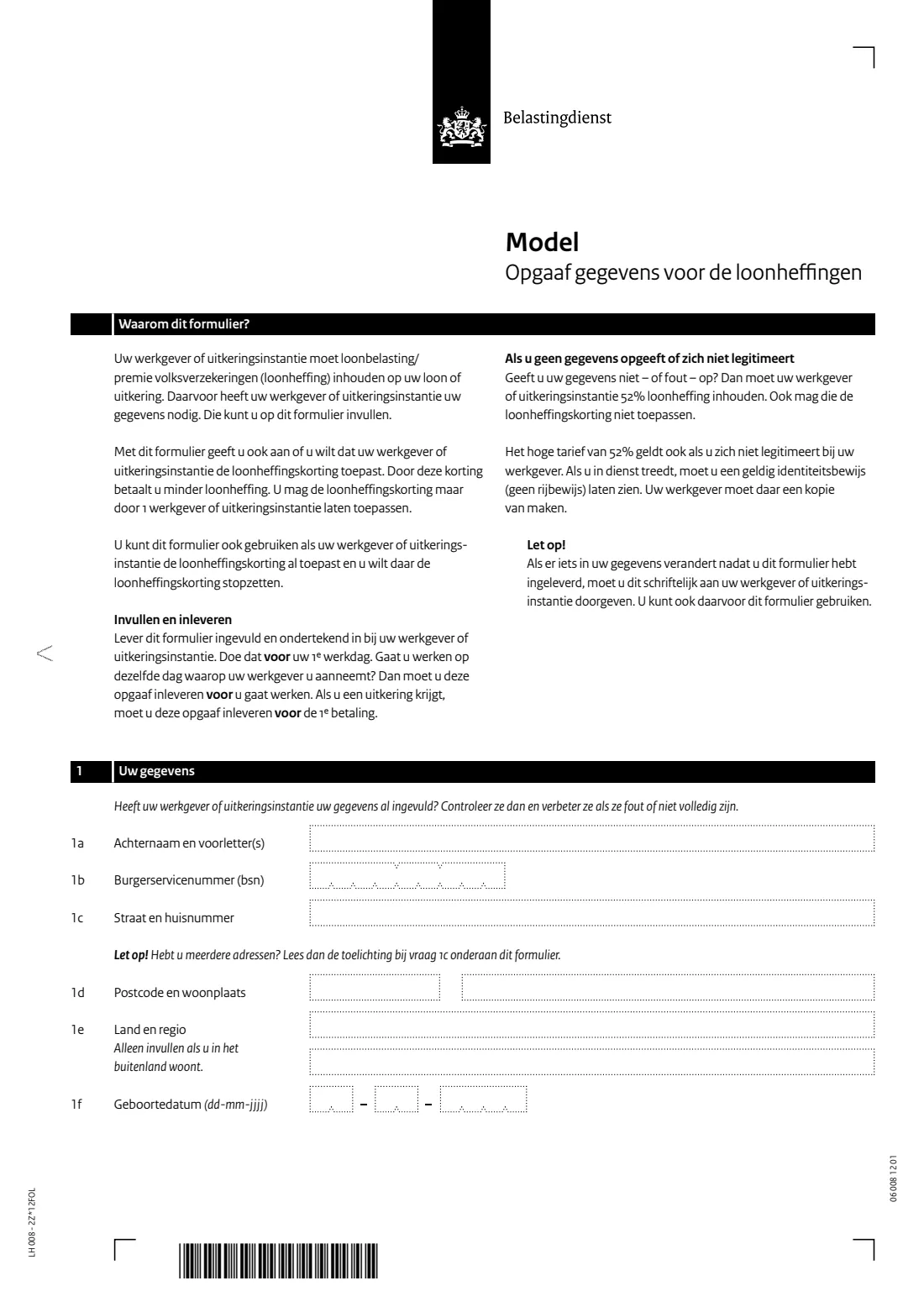
The Model Opgaaf gegevens voor de loonheffingen is the Dutch Tax and Customs Administration's (Belastingdienst) standard form for passing your details to whoever pays you: an employer or a benefits agency (uitkeringsinstantie). They need your name, citizen service number (BSN), address and date of birth to withhold payroll tax (loonheffing), which covers wage tax and national insurance contributions. On the same form you say whether this payer should apply the payroll tax credit (loonheffingskorting), which lowers the tax taken from your pay. This page covers the edition with form code LH 008 - 2Z*12FOL.
It matters more than it looks. The form warns that if you give no details, or wrong ones, or don't identify yourself, your employer must withhold 52% payroll tax and may not apply the payroll tax credit. It also stresses that the credit may be applied by only one employer or benefits agency at a time, so the choice you make here affects every job or benefit you have.
FileIt walks you through the form in English, with the Dutch wording alongside, and prints your answers into the Belastingdienst's own PDF. Your name and date of birth can be pre-filled from the People records in your FileIt vault, your BSN is checked with the eleven test before anything is printed, and the finished PDF is saved in your vault. You can sign it by hand or, if your employer accepts it, with FileIt's optional e-signature. FileIt never sends the form anywhere: you hand it to your employer or benefits agency yourself.
- Who fills it
- The employee or benefit recipient
- Given to
- Your employer or benefits agency, not the Belastingdienst
- When
- Before your first working day, or before the first benefit payment
- Signatures
- You sign in the box on page 2
- Edition
- LH 008 - 2Z*12FOL
Who needs to fill out Opgaaf gegevens voor de loonheffingen (payroll tax details)?
- Anyone starting a new job in the Netherlands, including a second job alongside an existing one.
- People starting to receive a benefit or pension from a benefits agency that withholds payroll tax.
- Employees who want to switch which employer or benefits agency applies the payroll tax credit.
- Employees who want to stop an employer applying the payroll tax credit, for example because another employer now applies it.
- Older people entitled to the single older person's tax credit (alleenstaande-ouderenkorting) who want a payer to apply it.
- Anyone whose details changed after handing in the form; the form says you can use it again to report changes in writing.
When to use Opgaaf gegevens voor de loonheffingen (payroll tax details)
- Before your first working day with a new employer. If you start work on the same day you're hired, hand it in before you start working.
- Before the first payment of a benefit from a benefits agency.
- When you want a different employer or benefits agency to apply the payroll tax credit: use one copy to say 'Yes' to the new payer and another copy to say 'No' to the old one.
- When your personal details change, such as a new address; the form asks you to tell your employer in writing.
- When you have two jobs with the same employer and want the credit applied to only one of the wages.
What you need before you start
- Your surname and initials.
- Your citizen service number (burgerservicenummer, BSN), found on your passport, Dutch ID card or residence document and on Belastingdienst letters.
- Your address: street and house number, postcode and town, or your country and region if you live abroad.
- Your date of birth.
- Your latest payslips from other employers or benefits agencies, to see whether they already apply the payroll tax credit ('Loonheffingskorting: Ja', or an amount for 'Verrekende arbeidskorting').
- The date from which the credit should start or stop.
- If you're of state pension (AOW) age: whether you are entitled to the single older person's tax credit.
- A valid identity document (not a driving licence) to show your employer when you start.
What’s on Opgaaf gegevens voor de loonheffingen (payroll tax details)
The 2026 edition has 4 pages. FileIt asks for it in 3 parts, and it is signed by Employee or benefit recipient (werknemer / uitkeringsgerechtigde):
- 1. Your details (Uw gegevens)Employee or benefit recipient (werknemer / uitkeringsgerechtigde)
- 2. Applying the payroll tax credit (Loonheffingskorting toepassen)Employee or benefit recipient (werknemer / uitkeringsgerechtigde)
- 3. Signature (Ondertekening)Employee or benefit recipient (werknemer / uitkeringsgerechtigde)
How to fill out Opgaaf gegevens voor de loonheffingen (payroll tax details), step by step
1 1 Uw gegevens (your details)
Give your surname and initials (1a), your BSN (1b), your street and house number (1c), your postcode and town (1d), and your date of birth (1f). Only fill in country and region (1e) if you live abroad. If your employer already filled in some details, check them and correct anything wrong or missing.
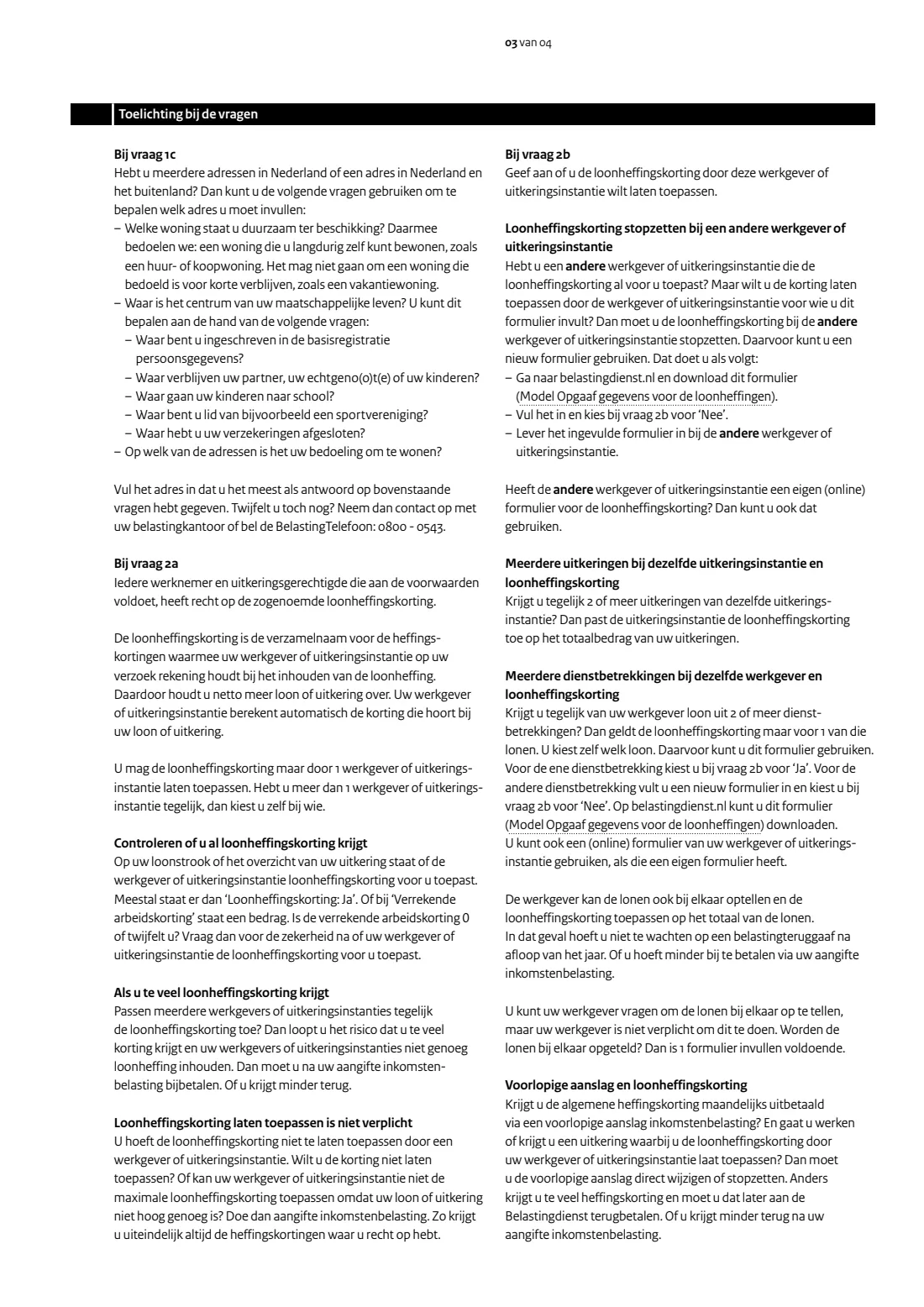
If you have more than one address, in the Netherlands or in the Netherlands and abroad, the notes to question 1c help you choose. Give the home that is permanently available to you and that is the centre of your life: where you're registered in the personal records database (BRP), where your partner or children live and go to school, and where your clubs and insurances are.
2 2a Only one payer may apply the payroll tax credit
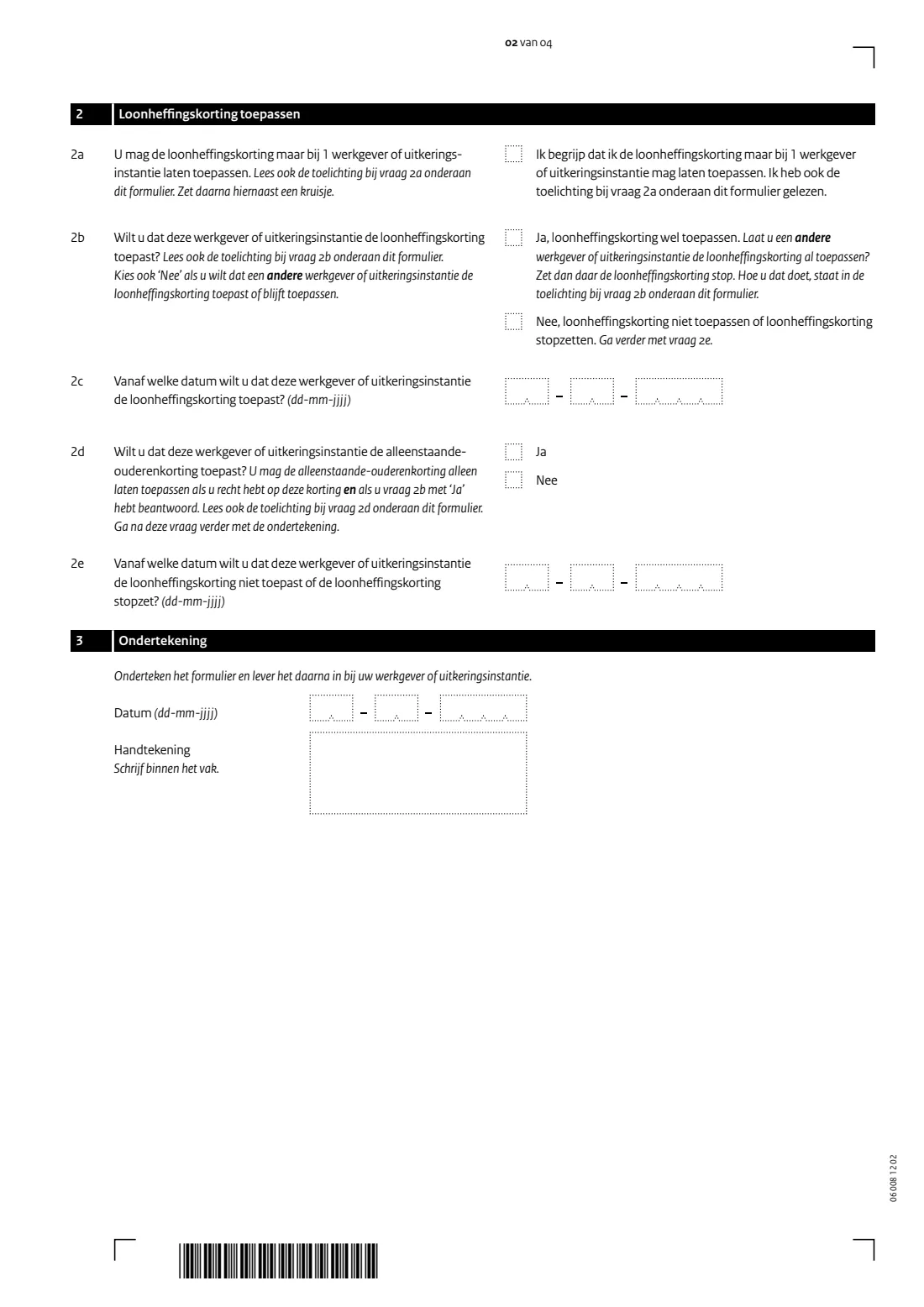
Tick the box to confirm you understand that the payroll tax credit may be applied by only one employer or benefits agency, and that you've read the explanation. The credit is the collective name for the tax credits your payer takes into account when withholding payroll tax; they work out the amount themselves. If several payers apply it at the same time, too little tax is withheld and you'll have to pay back after your income tax return, or get less back.
3 2b Apply the payroll tax credit here?
Choose 'Ja' if you want this employer or benefits agency to apply the credit. Choose 'Nee' if you don't, including when another employer or agency applies it or should keep applying it. If you say 'Ja' while another payer already applies the credit, stop it there by giving that payer a new copy of this form with 'Nee' at 2b, or their own form.
Applying the credit isn't compulsory. If you don't have it applied, or your pay is too low for the full credit, file an income tax return to get the credits you're entitled to.
4 2c Start date
If you answered 'Ja', give the date from which this payer should apply the credit, usually your first working day or first benefit payment.
5 2d Single older person's tax credit (alleenstaande-ouderenkorting)
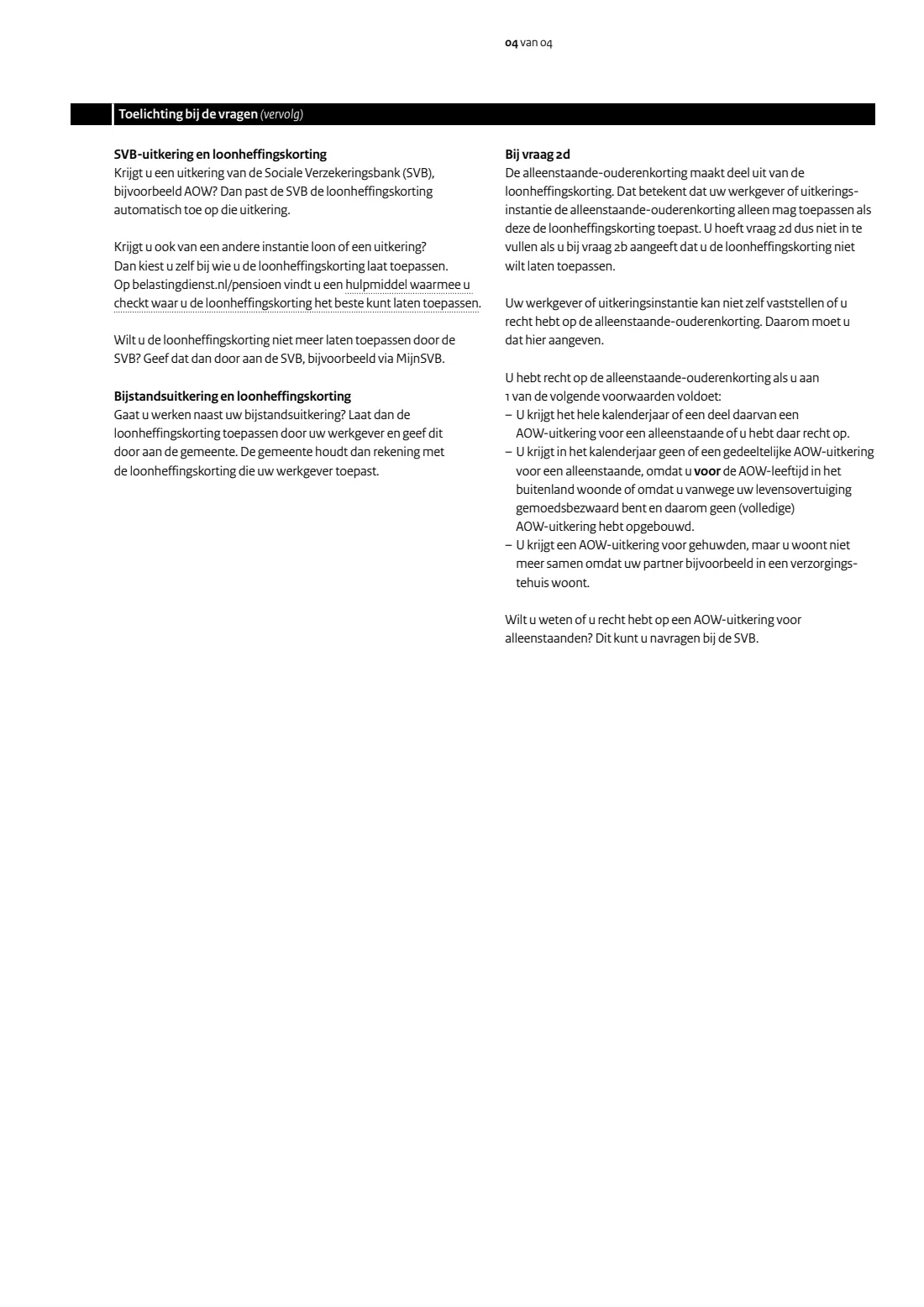
Only answer this if you said 'Ja' at 2b. Your employer can't check whether you're entitled, so you tell them here. According to the form's notes, you're entitled if, for example, you receive or are entitled to a state pension (AOW) for a single person, or you receive no or only a partial single-person AOW because you lived abroad before AOW age or have conscientious objections, or you receive AOW for married people but no longer live together because your partner lives in a care home. The SVB can tell you whether you're entitled to AOW for single people.
6 2e Stop date
If you answered 'Nee', give the date from which this payer should not apply the credit, or should stop applying it.
7 3 Ondertekening (signature)
Date the form and sign within the box, then hand it to your employer or benefits agency. FileIt prints the date in the dd-mm-jjjj boxes; you sign by hand on the printout or with FileIt's e-signature if your employer accepts an electronically signed copy.
Common mistakes to avoid
- Saying 'Ja' at 2b with two employers at the same time. Only one payer may apply the payroll tax credit.
- Switching the credit to a new job without stopping it at the old one. Give the old payer a copy with 'Nee' at 2b.
- Mistyping the BSN. A wrong number can lead to the 52% rate; FileIt checks the number with the eleven test first.
- Handing the form in after your first working day or first payment. The form asks for it before.
- Filling in 1e (country and region) while living in the Netherlands. It's only for addresses abroad.
- Answering 2d without being entitled to the single older person's tax credit, or while answering 'Nee' at 2b.
- Forgetting to change or stop a provisional assessment (voorlopige aanslag) that pays you the general tax credit monthly once an employer applies the credit.
- Bringing a driving licence as ID. The form says it must be a valid identity document other than a driving licence.
After you fill it out
Sign the form in the box on page 2 and give it to your employer or benefits agency before your first working day or first payment. It doesn't go to the Belastingdienst. When you start work, also show your employer a valid identity document other than a driving licence; they must keep a copy.
Check your first payslip to see whether the payroll tax credit is applied as you asked. If you switched the credit from another payer, make sure that payer received a 'Nee' form too. If you receive the general tax credit monthly through a provisional assessment, change or stop it straight away.
Keep your copy: FileIt saves the filled PDF in your vault. If your details change later, tell your employer in writing; a new copy of this form is the easiest way.
Fill out Opgaaf gegevens voor de loonheffingen (payroll tax details) online with FileIt
- Pick the person. Choose someone from People and FileIt fills in their name, date of birth, address and other details it already knows.
- Answer plain-language questions. One part of the form at a time, with the official help text beside each question — 15 fields in all. Your answers save as you go.
- Check the live preview. Watch your answers land on the real Belastingdienst (Dutch Tax and Customs Administration) form, and let FileIt do any worksheet arithmetic.
- Generate the official PDF. FileIt prints your answers into the agency’s own PDF and files it in that person’s folder in your vault. Sign it, or send it for e-signature.
FileIt fills the form — it never files or submits anything for you. Deliver the finished form to whoever asked for it, the way the form’s instructions say.
Start Opgaaf gegevens voor de loonheffingen (payroll tax details) now — it’s freeOpgaaf gegevens voor de loonheffingen (payroll tax details): frequently asked questions
What is the Opgaaf gegevens voor de loonheffingen?
It is the Belastingdienst's model form for giving your employer or benefits agency the details they need to withhold payroll tax: name, BSN, address and date of birth. On it you also say whether they should apply the payroll tax credit (loonheffingskorting).
What happens if I don't hand it in?
The form says your employer or benefits agency must then withhold 52% payroll tax and may not apply the payroll tax credit. The same applies if you don't show valid ID when you start work.
Can I have the payroll tax credit applied by two employers?
No. The credit may be applied by only one employer or benefits agency at a time. If several apply it, too little tax is withheld and you'll have to pay back after your income tax return.
How do I stop the payroll tax credit at my old job?
Fill in a new copy of the form, answer 'Nee' at 2b with the date it should stop, and give it to that employer or benefits agency. Some employers have their own form, which you can use instead.
Can I fill out the form online?
Yes. FileIt lets you answer the questions in English and prints them into the official Belastingdienst PDF, free on every FileIt account. You then sign it and hand it to your employer yourself.
Where do I hand it in?
To your employer or benefits agency, not to the Belastingdienst. FileIt doesn't send it for you.
Can I sign it electronically?
The form just asks for your signature in the box. Whether an electronically signed copy is accepted is up to your employer or benefits agency, so check with them first. FileIt offers an optional e-signature, and you can always print and sign by hand.
What is the alleenstaande-ouderenkorting?
The single older person's tax credit, part of the payroll tax credit. You can ask your payer to apply it at question 2d only if you're entitled, generally because you receive a single-person state pension (AOW), and only if you answered 'Ja' at 2b.
Official sources
- Blank form (PDF), published by Belastingdienst (Dutch Tax and Customs Administration): https://download.belastingdienst.nl/belastingdienst/docs/model_opgaaf_gegevens_loonheffingen_lh0082z12fol.pdf
- Official instructions and guidance: https://www.belastingdienst.nl/wps/wcm/connect/bldcontentnl/themaoverstijgend/programmas_en_formulieren/model_opgaaf_gegevens_voor_de_loonheffingen
- Edition shown on this page: LH 008 - 2Z*12FOL (checked 2026-09-26).
FileIt is not affiliated with or endorsed by Belastingdienst (Dutch Tax and Customs Administration) or any government. This page explains the form in general terms and is not legal, tax or immigration advice. Always read the official instructions, and check that you are using the edition the recipient accepts. Page last reviewed 2026-09-26.