What is Prohlášení poplatníka (25 5457)?
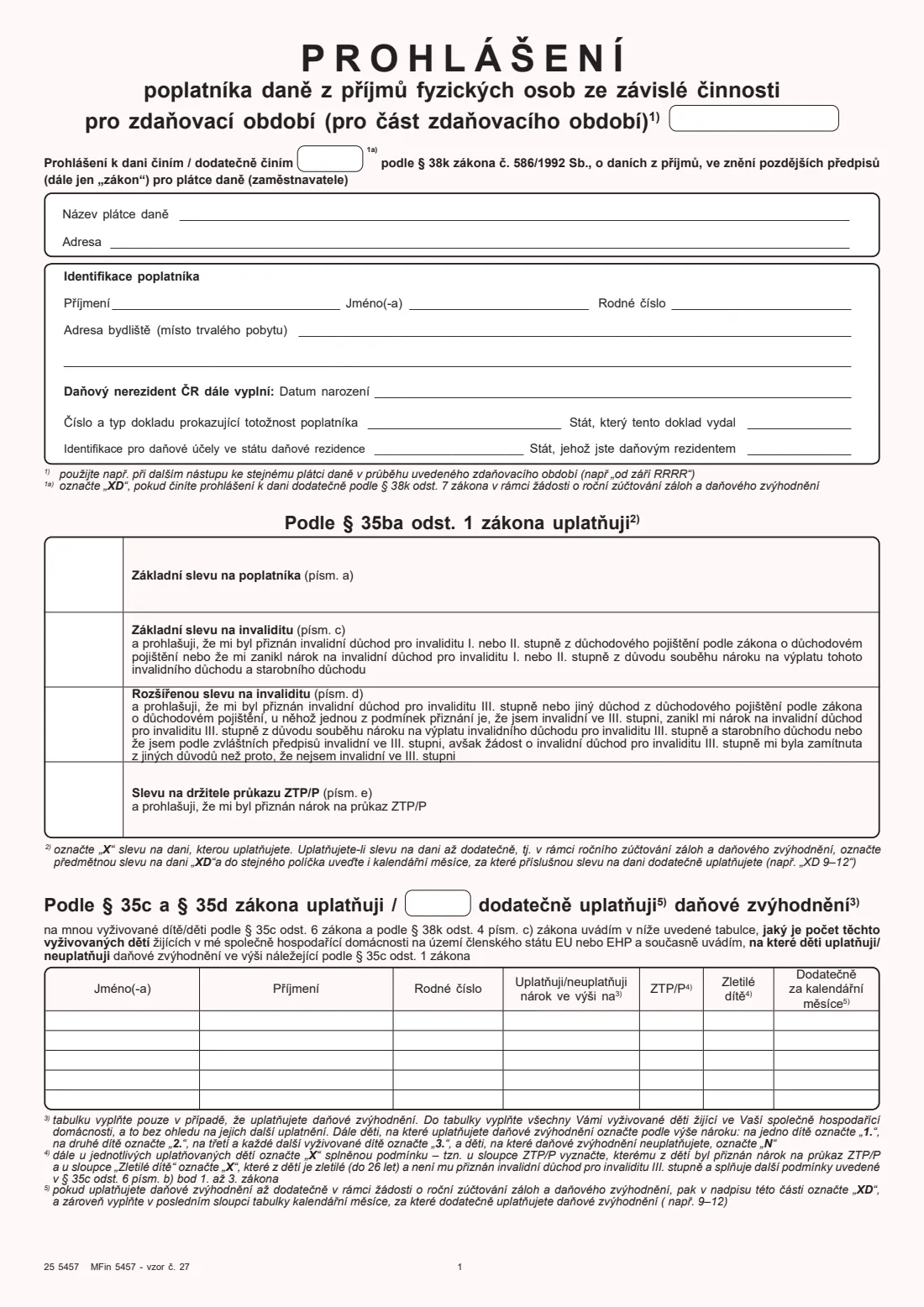
The Prohlášení poplatníka daně z příjmů fyzických osob ze závislé činnosti — usually just called the "prohlášení" or the signed tax declaration — is the Czech Financial Administration's form 25 5457 (MFin 5457, vzor č. 27). An employee gives it to their employer, who is the payer of tax (plátce daně), under § 38k of the Income Tax Act. With a signed declaration in place, the employer deducts the tax credits from the monthly tax advance and can pay out the child tax benefit, instead of you waiting until a tax return to get them.
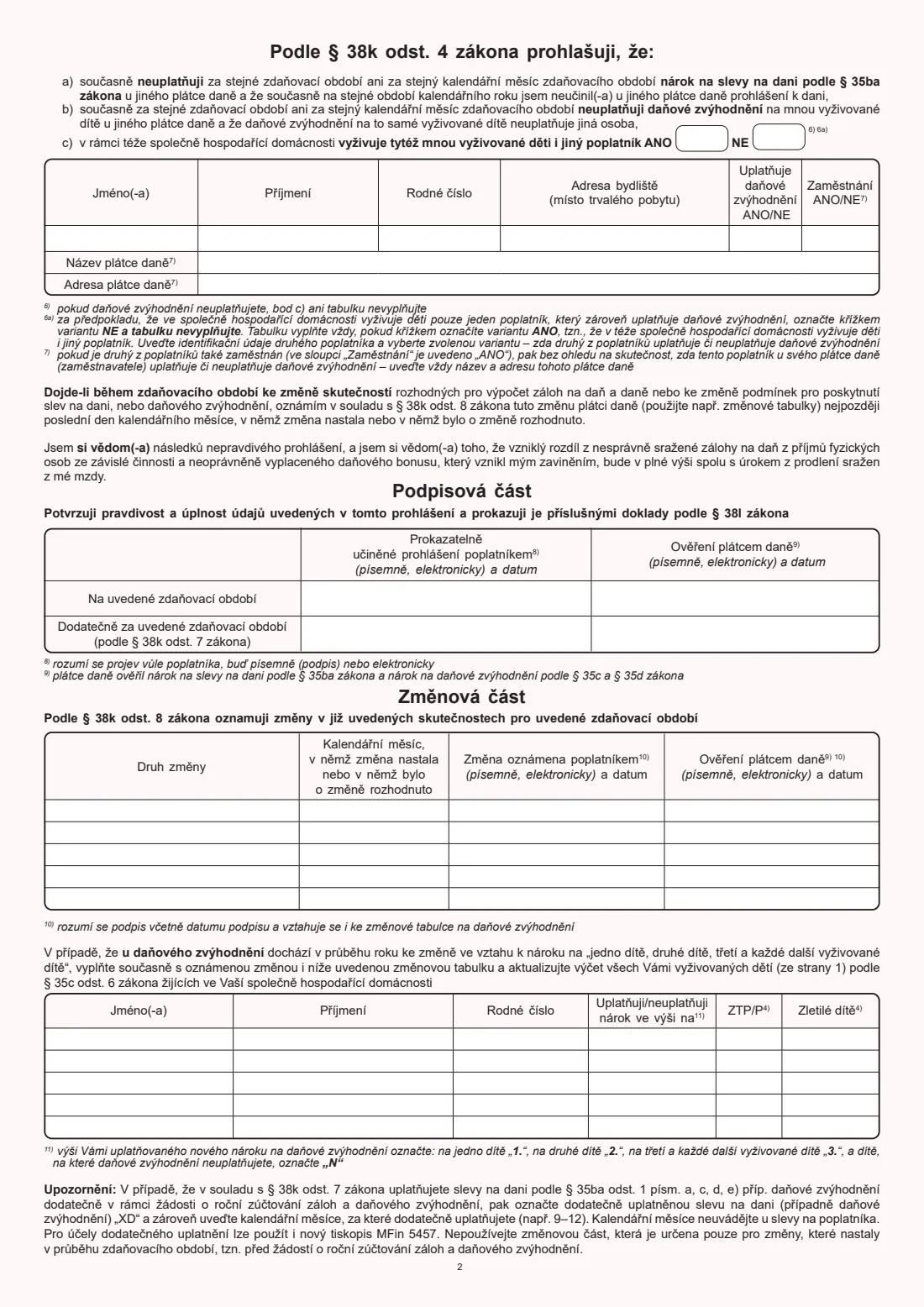
The two-page form covers the tax period, your employer and your identification, the tax credits under § 35ba(1) (the basic taxpayer credit, the two disability credits and the ZTP/P card credit), the child tax benefit with a table of every dependent child in your household, a statement about any other taxpayer who supports the same children, the signature table, and a change section for reporting changes during the year. You can have a signed declaration with only one employer for the same period.
FileIt walks you through the form in English, pre-fills your name and your employer from the People in your FileIt vault, checks your birth numbers (rodné číslo) and the form's own rules — the order of the children, retrospective "XD" claims, children's ages — and prints your answers into the official Finanční správa PDF. The finished form is saved in your vault. The form accepts a written or electronic signature, so you can sign it by hand or send it for e-signature, and then you give it to your employer yourself. FileIt never submits anything.
- Who fills it
- The employee (poplatník), for one tax year or the part of it spent with that employer
- Given to
- Your employer, the payer of tax (plátce daně) — not the tax office
- When
- When you start a job, for each new tax year, and retrospectively with a request for the annual settlement
- Signatures
- The employee signs and dates it (in writing or electronically); the employer verifies it
- Edition
- 25 5457 MFin 5457 - vzor č. 27
- Children per form
- Five rows in the children table
Who needs to fill out Prohlášení poplatníka (25 5457)?
- Employees in the Czech Republic who want their employer to apply the basic taxpayer credit (sleva na poplatníka) to their monthly wages.
- Parents who want the child tax benefit (daňové zvýhodnění na vyživované dítě) paid through their payroll, including as a tax bonus.
- Employees who receive a first-, second- or third-degree invalidity pension, or who hold a ZTP/P card, and want those credits applied.
- Foreign workers who are Czech tax non-residents — the form has extra lines for your date of birth, identity document and foreign tax number.
- Employees who didn't sign a declaration during the year but ask their employer for the annual settlement (roční zúčtování) and want to claim credits retrospectively.
- Anyone whose situation changes during the year — a new child, a pension decision, a move — and needs to report it to the employer.
When to use Prohlášení poplatníka (25 5457)
- On starting a new job, so the credits apply from your first payslip — the tax period box then reads, for example, "od září 2026".
- At the start of each tax year: the declaration is made for a specific tax year, so a new one is signed for the next year.
- Retrospectively, after the year has ended, together with a request for the annual settlement of advances and the tax benefit — marked "XD".
- Whenever a fact in your declaration changes: the form says you report it by the last day of the calendar month in which the change happened or was decided.
- When your children or the benefit you claim for them change — the change section has its own updated table of all your children.
What you need before you start
- Your employer's full name and address.
- Your birth number (rodné číslo) and permanent address.
- For non-residents: your date of birth, identity document number and type, the issuing country, your foreign tax identification number and your country of tax residence.
- The names and birth numbers of all the dependent children living in your household.
- For adult children up to 26: proof they qualify, such as a confirmation of study.
- Your invalidity pension decision or ZTP/P card, if you claim those credits.
- The other parent's (or other taxpayer's) name, birth number and address, and their employer's name and address if they work.
- Documents to prove what you declare — the form says you prove the facts with documents under § 38l.
What’s on Prohlášení poplatníka (25 5457)
The 2026 edition has 2 pages. FileIt asks for it in 8 parts, and it is signed by Employee (poplatník) and Employer (plátce daně):
- Tax period and employer (plátce daně)Employee (poplatník)
- Identification of the taxpayer (Identifikace poplatníka)Employee (poplatník)
- Tax credits under § 35ba(1) (Slevy na dani)Employee (poplatník)
- Child tax benefit under § 35c and § 35d (Daňové zvýhodnění na vyživované dítě)Employee (poplatník)
- Signature (Podpisová část)Employee (poplatník)
- Changes during the year (Změnová část)Employee (poplatník)
- Updated list of children after a change (Změnová tabulka dětí)Employee (poplatník)
- Employer's verification (Ověření plátcem daně)Employer (plátce daně)
How to fill out Prohlášení poplatníka (25 5457), step by step
1 Tax period and dodatečně činím
The box at the top holds the tax period: the year, or the month you start from when the declaration covers only part of the year (the form's own example is "od září RRRR" — from September). FileIt builds this from the year and an optional starting month.
The small box after "Prohlášení k dani činím / dodatečně činím" is marked XD only when you make the declaration retrospectively under § 38k(7), as part of a request for the annual settlement.
2 Název plátce daně and Adresa
The name and address of your employer — the payer of tax to whom you give the declaration. FileIt pre-fills these from the employer linked to the person in your vault.
3 Identifikace poplatníka
Your surname, first name(s), birth number and permanent address (místo trvalého pobytu). FileIt checks that the birth number contains a real date and, for 10-digit numbers, that its check digit is right.
If you are a Czech tax non-resident, the next three lines ask for your date of birth, your identity document and the country that issued it, and your tax identification in the country where you are tax resident.
4 Podle § 35ba odst. 1 zákona uplatňuji — tax credits
Four rows: the basic credit for the taxpayer (písm. a), the basic disability credit for a first- or second-degree invalidity pension (písm. c), the extended disability credit for third-degree invalidity (písm. d), and the credit for a ZTP/P card holder (písm. e). Mark each credit you claim with X.
If you claim a credit only retrospectively in the annual settlement, it is marked XD with the calendar months, like "XD 9–12" — except the basic taxpayer credit, which takes no months. The basic and extended disability credits exclude each other, and FileIt won't let you tick both.
5 Podle § 35c a § 35d zákona uplatňuji — child tax benefit
Fill this table only if you claim the child tax benefit. List every dependent child living in your household in the Czech Republic, the EU or the EEA — including those you don't claim for. For each, write the first name, surname and birth number, and mark the benefit you claim: 1. for the first child, 2. for the second, 3. for the third and every further child, and N for a child you don't claim for.
Mark ZTP/P for a claimed child who holds that card, and "Zletilé dítě" for an adult child up to 26 who qualifies (for example, is studying) and doesn't get a third-degree invalidity pension. For a retrospective claim, the heading gets XD and the last column holds the calendar months.
6 Podle § 38k odst. 4 zákona prohlašuji — your statements
At the top of page 2 you declare that you don't claim the same tax credits with another employer for the same period, and don't claim the child benefit elsewhere, and that no one else claims it for the same child.
Point c) asks whether another taxpayer in the same household also supports the children — ANO (yes) or NE (no). If yes, give their name, birth number and address, whether they claim the benefit, and whether they are employed; if they are, add their employer's name and address, whether or not they claim it there.
7 Podpisová část — signature
You confirm the declaration is true and complete and that you will prove it with documents. You sign in the column "Prokazatelně učiněné prohlášení poplatníkem" — in the row for the tax period, or in the "Dodatečně" row when you declare retrospectively — and add the date. The form says a signature can be written or electronic. The employer verifies your entitlement and signs and dates the right-hand column.
8 Změnová část — changes during the year
Use this only to report changes to a declaration you have already given for the year: what changed, the month it happened or was decided, and the date you report it, with your signature. If the change affects the child tax benefit, fill in the updated table below with all your dependent children as they are after the change. The form says not to use the change section in a request for the annual settlement.
Common mistakes to avoid
- Signing a declaration with two employers for the same period — the form lets you claim the credits with only one payer at a time.
- Leaving children you don't claim for out of the table — list every dependent child in the household and mark those as N.
- Marking two children as the first (1.) or skipping 1. — claim in order: 1., 2., then 3. for every further child.
- Writing months beside the basic taxpayer credit when claiming it retrospectively — only XD goes in that box.
- Forgetting the other taxpayer's employer when they work — the form wants the employer's name and address whether or not they claim the benefit.
- Mistyping a birth number — FileIt checks the date part and the check digit, but compare it against the birth certificate too.
- Not reporting a change on time — the form asks you to report it by the last day of the month in which it happened.
- Ticking 'Zletilé dítě' for a child who is still under 18, or not ticking it for an adult child you claim for.
After you fill it out
Sign and date the declaration — by hand on the printout, or electronically if your employer accepts that, since the form allows a written or electronic statement. If you declare retrospectively with the annual settlement request, sign in the "Dodatečně" row.
Give the form to your employer's payroll or HR department yourself, with the documents that prove your claims, such as a birth certificate, a confirmation of study, a pension decision or the ZTP/P card. The employer checks your entitlement and verifies the form in its own column. FileIt doesn't send the form to your employer or to the tax office.
A copy stays in your FileIt vault, filed under your name. Make a new declaration for the next tax year, and report any change during the year in the change section, by the end of the month in which it happened.
Fill out Prohlášení poplatníka (25 5457) online with FileIt
- Pick the person. Choose someone from People and FileIt fills in their name, date of birth, address and other details it already knows.
- Answer plain-language questions. One part of the form at a time, with the official help text beside each question — 123 fields in all. Your answers save as you go.
- Check the live preview. Watch your answers land on the real Finanční správa České republiky (Czech Financial Administration, FS ČR) — Ministry of Finance form MFin 5457 form, and let FileIt do any worksheet arithmetic.
- Generate the official PDF. FileIt prints your answers into the agency’s own PDF and files it in that person’s folder in your vault. Sign it, or send it for e-signature.
FileIt fills the form — it never files or submits anything for you. Deliver the finished form to whoever asked for it, the way the form’s instructions say.
Start Prohlášení poplatníka (25 5457) now — it’s freeProhlášení poplatníka (25 5457): frequently asked questions
What is the Prohlášení poplatníka?
It is the Czech employee's tax declaration, form 25 5457 from the Financial Administration. You give it to your employer so that the tax credits and the child tax benefit are applied to your monthly wages. Without it, the employer can't apply them during the year.
Can I fill in the Prohlášení poplatníka online in English?
Yes. FileIt explains each question in English and prints your answers into the official Czech PDF (vzor 27). It pre-fills your details from your vault, checks birth numbers and the form's rules, and saves the finished PDF. You then sign it and give it to your employer.
Where do I send the form?
To your employer, not the tax office. The declaration is addressed to the payer of tax (plátce daně), who keeps it and verifies your entitlement. Hand it to payroll or HR, or send it electronically if your employer accepts electronic declarations.
Can I sign the declaration with two employers?
No. On page 2 you declare that you don't claim the same credits or the child benefit with another employer for the same period or month. You choose one employer to apply them.
What does XD mean on the form?
XD marks a retrospective claim (dodatečně), made in the annual settlement of advances and the tax benefit. It goes in the box for a credit — with the calendar months, except for the basic taxpayer credit — in the heading of the child benefit section, and in the box at the top when the whole declaration is made retrospectively.
Do I list children I don't claim for?
Yes. The form asks for every dependent child living in your household, and those you don't claim the benefit for are marked N. Children you claim for are marked 1., 2. or 3. for the third and every further child.
Can a non-resident sign the declaration?
Yes — the form has extra lines for tax non-residents: date of birth, identity document, the country that issued it, the foreign tax identification number and the country of tax residence. Whether a non-resident is entitled to a particular credit depends on the law, so check with your employer or the tax office.
What if my situation changes during the year?
Report it to your employer in the change section (Změnová část) by the last day of the calendar month in which the change happened or was decided. If the change affects the child benefit, also fill in the updated table of all your children.
Official sources
- Blank form (PDF), published by Finanční správa České republiky (Czech Financial Administration, FS ČR) — Ministry of Finance form MFin 5457: https://financnisprava.gov.cz/assets/tiskopisy/5457_27.pdf
- Official instructions and guidance: https://financnisprava.gov.cz/cs/dane/danove-tiskopisy
- Edition shown on this page: 25 5457 MFin 5457 - vzor č. 27 (checked 2026-09-26).
FileIt is not affiliated with or endorsed by Finanční správa České republiky (Czech Financial Administration, FS ČR) — Ministry of Finance form MFin 5457 or any government. This page explains the form in general terms and is not legal, tax or immigration advice. Always read the official instructions, and check that you are using the edition the recipient accepts. Page last reviewed 2026-09-26.